Stuck?  support@mecway.com
support@mecway.com

Mecway
FEA
CXX Contact

Hi all,
I am having issues with CXX contacts (symmetric model of rod in a hole).
Contacts 3 and 3b (bonded, elastic) cause stress without any load on the model.
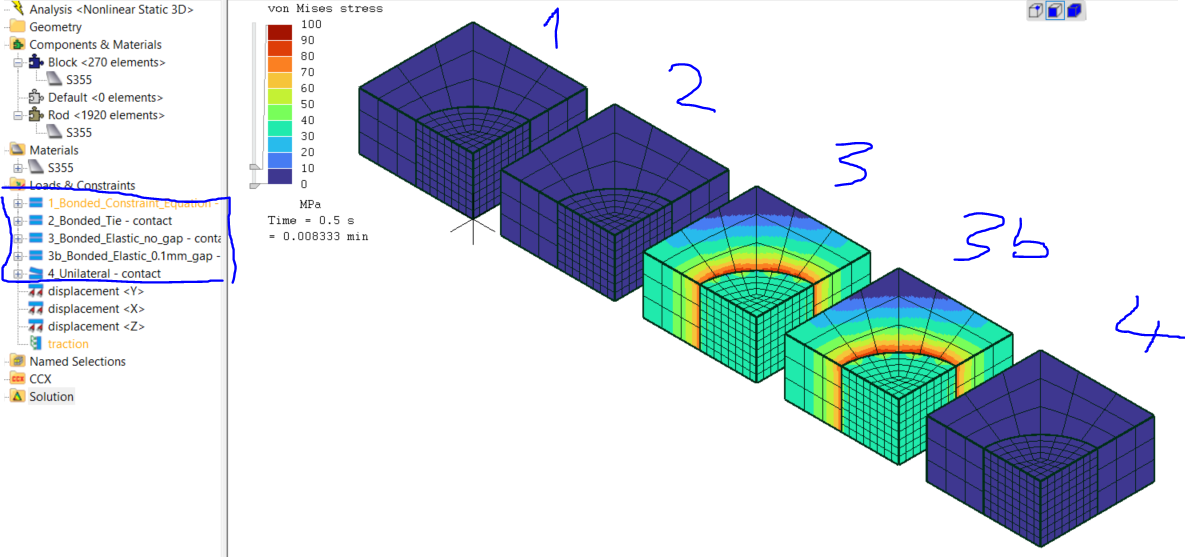
It gets worse with increasing contact stiffness (1st image: 2000 GPa/m, second image: 200000 GPa/m
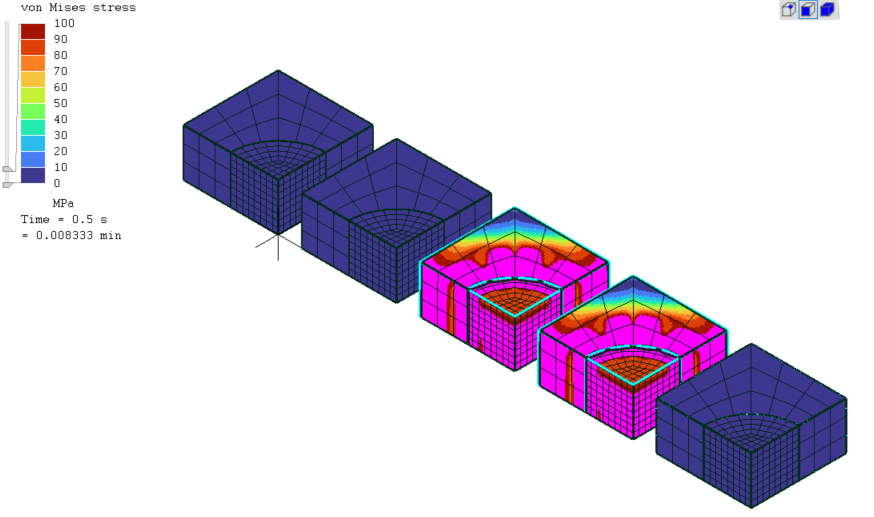
What am I missing?
I am having issues with CXX contacts (symmetric model of rod in a hole).
Contacts 3 and 3b (bonded, elastic) cause stress without any load on the model.
It gets worse with increasing contact stiffness (1st image: 2000 GPa/m, second image: 200000 GPa/m
What am I missing?
Howdy, Stranger!
It looks like you're new here. If you want to get involved, click one of these buttons!
Comments
Some contact definitions are solved as an interference fit. take a look at the adjust parameter.
From the information in the manual I thought that interferences or gaps are dealt with without causing stress, because it says:
"Elastic, CCX solver:
This creates elastic springs between the surfaces. As with Tie, the nodes of the slave surface are
moved in a strain-free way so they lie on the master surface."
For the rectangluar rod, the slave node in the corner does not seem to know where to move if there is an initial gap.
it moves to the top, but not to the left...
I cant really make sense of it. Any ideas?