Need Help with Mesh Improvement

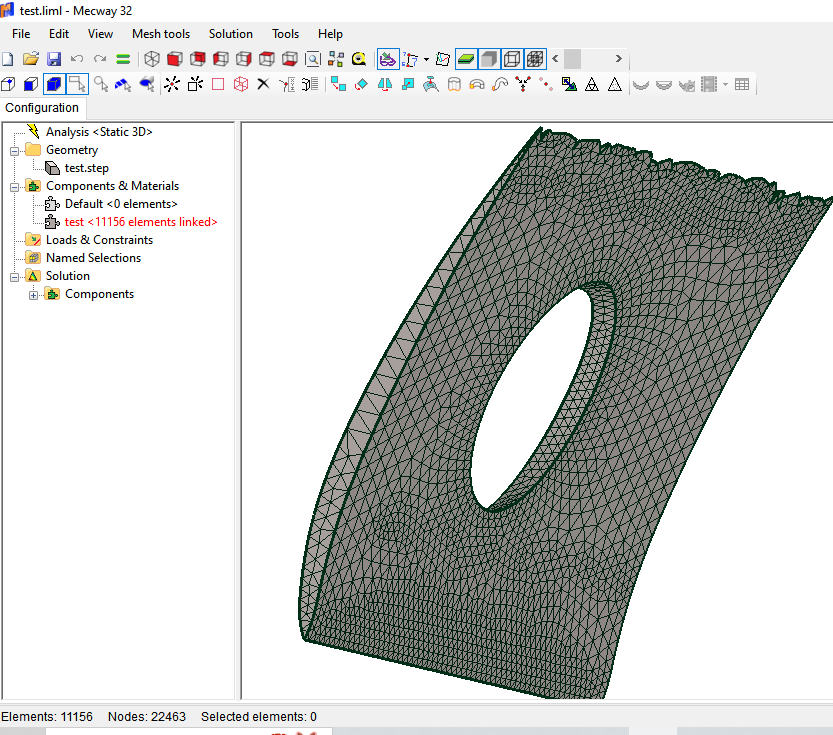
As a beginner, I am trying to mesh an airfoil with a hole at the center as seen below. The mesh is generated without any error message but the mesh quality near the trailing edge seems to be unacceptable. Does anyone know how I can improve the mesh quality of the airfoil?
Thanks


Comments

  • I download both ur .liml and step file. I struggled to make a decent mesh form the step file with in the .liml. However once I downloaded the step (which came out as a polysurface with no sides in rhino) i generated a full solid - brought it back into Mecway and it meshed very easily. While playing around in rhino I also made a slightly more structured mesh by extruding surfaces and doing so boolean mesh splits -some times its worth the time to get a better mesh to work with - not sure it was worth the effort in this case!

  • I don't know what rhino is and I do not want to deal with it. Thanks
  • You may have to defeature the geometry (in CAD) by removing the tiny radius on the trailing edge. Looks like that's what Fatmac did too?
Sign In or Register to comment.

Howdy, Stranger!

It looks like you're new here. If you want to get involved, click one of these buttons!