Stuck?  support@mecway.com
support@mecway.com

Mecway
FEA
Thermal Stress Calculation Failing

I am performing a thermal stress calculation on a somewhat odd shaped part. I've performed this process many times on other parts in the past:
1. Find the steady state thermal solution.
2. Select Static 3D analysis.
3. Transfer temperatures.
4. Add stress temperature.
5. Solve.
The temperature analysis works just fine. However when I do the static 3d solve, the solver runs for a while, ends with a solver finished message, no errors. However there is no solution in the tree.
To test, I repeated the tutorial from the manual, 16.10 thermal stress. This is the screen after the final solve.
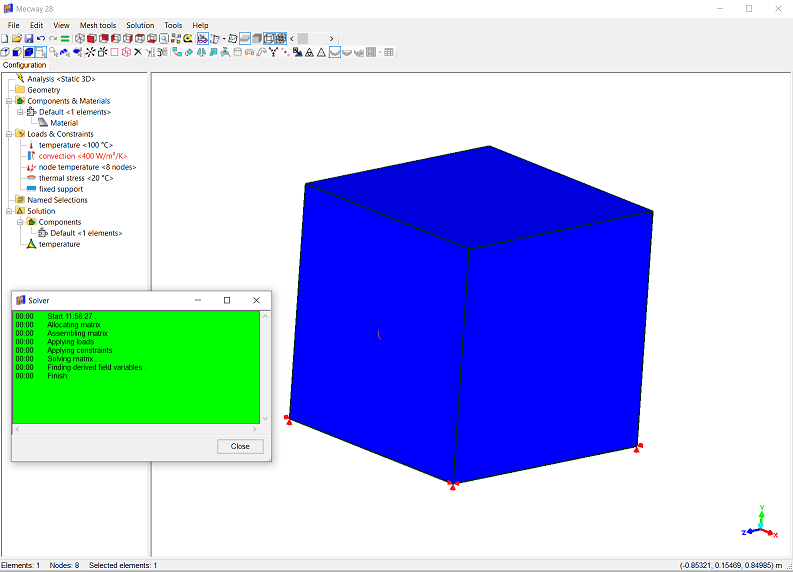
Anyone else having a similar problem? Maybe I'm just doing something wrong. Using Mecway 28.
J
1. Find the steady state thermal solution.
2. Select Static 3D analysis.
3. Transfer temperatures.
4. Add stress temperature.
5. Solve.
The temperature analysis works just fine. However when I do the static 3d solve, the solver runs for a while, ends with a solver finished message, no errors. However there is no solution in the tree.
To test, I repeated the tutorial from the manual, 16.10 thermal stress. This is the screen after the final solve.
Anyone else having a similar problem? Maybe I'm just doing something wrong. Using Mecway 28.
J
Howdy, Stranger!
It looks like you're new here. If you want to get involved, click one of these buttons!
Comments
To correct it, add displacement, stress, etc. to the solution before solving.
What's happening is there's only a Temperature solution variable so that's all it generates. If there's nothing (like at the start of the thermal analysis), Mecway automatically adds suitable ones but not when something's already there.
After some fiddling, it seems like the most reliable to do the thermal stress analysis is:
1. Bring model into Mecway or create in Mecway.
2. Mesh or bring in external mesh.
3. Select Static 3D
4. Assign materials.
4. Add supports as needed, and a zero displacement to a node.
5. solve.
6. Switch to Thermal Steady State
7. Add thermal constraints.
8. Solve.
9. Back to Static 3D
10. add temperatures from solution.
11. add stress temperature.
12. solve.
Thanks for the help!
J